Smurfs Magic Match Help Center home page Smurfs Magic Match
Garden City Games Community Submit a request Sign in
  1. Smurfs Magic Match
  2. Account
  3. Account Questions

Search

How do I update my Profile?

You can update your profile by tapping on the Settings "cog" icon at the bottom of your screen. From there, tap on "Player Profile". You can change your name and avatar. Your name must be between 3 and 24 characters. Each time you change your name, it costs 200 gold.
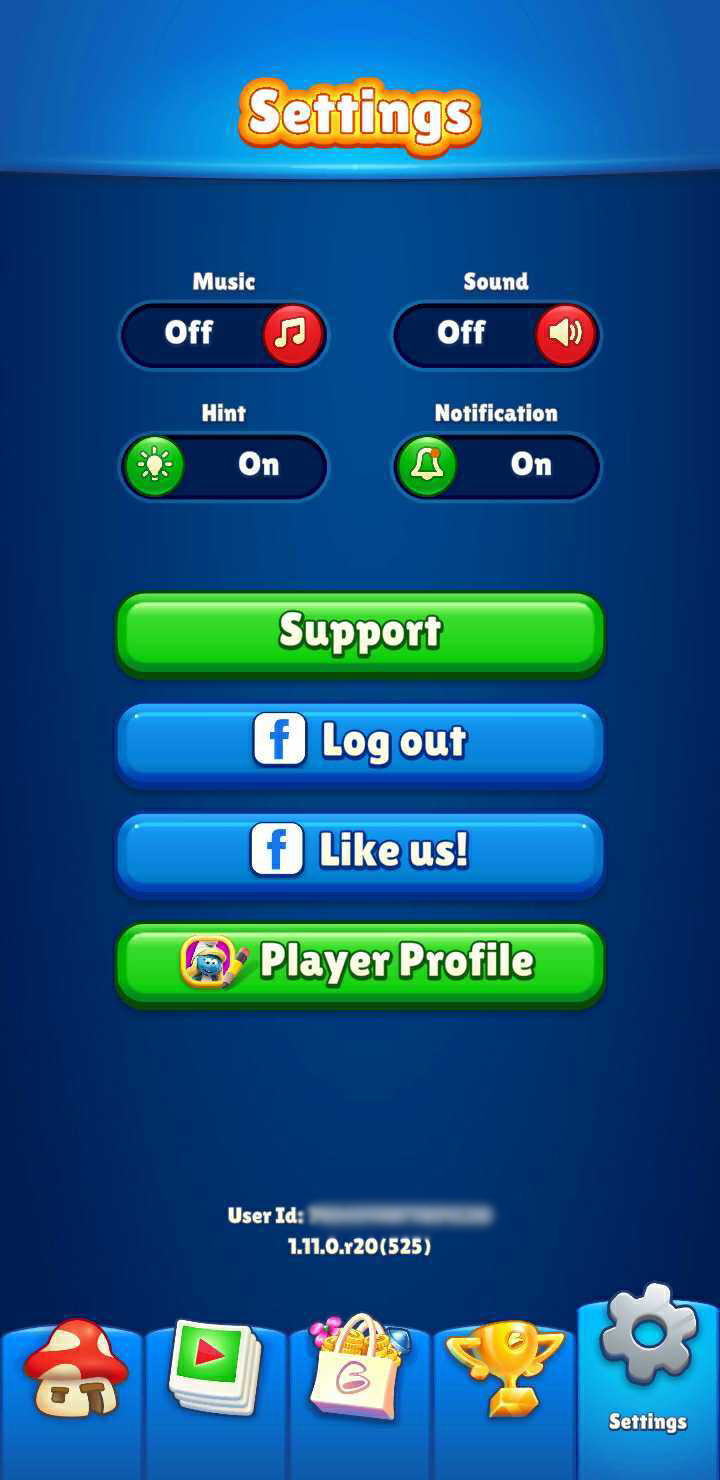

Screenshot_20220317-141951_Magic_Match.png          Screenshot_20220317-142031_Magic_Match.jpg

Was this article helpful?

16 out of 32 found this helpful

Have more questions? Submit a request

Related articles

  • How do I back up my account and save my progress?
  • What is Smurfs Magic Match?
  • I need help! How do I contact the Support team?
  • Papa's Spellbook Showdown
  • How do I recover my progress or restore my old village/account after reinstalling the game or getting a new device?

Articles in this section

  • I am having trouble logging in or linking my account using a third-party service like Facebook or Apple/Google ID.
  • How do I request to delete my account and game data or start a new game from scratch?
  • How do I recover my progress or restore my old village/account after reinstalling the game or getting a new device?
  • How do I update my Profile?
  • How do I back up my account and save my progress?
Garden City Games Home Privacy Policy Terms of Service